
Free template
Free road trip itinerary template — spreadsheet or printable
Excel · Google Sheets · Numbers · printable PDF (Letter & A4) · free, no sign-up
A road trip itinerary has one job: tell you, on any given morning, where you're driving, how long it takes, and where you're sleeping tonight — with the confirmation number to hand. This template does exactly that, in a spreadsheet or on paper.
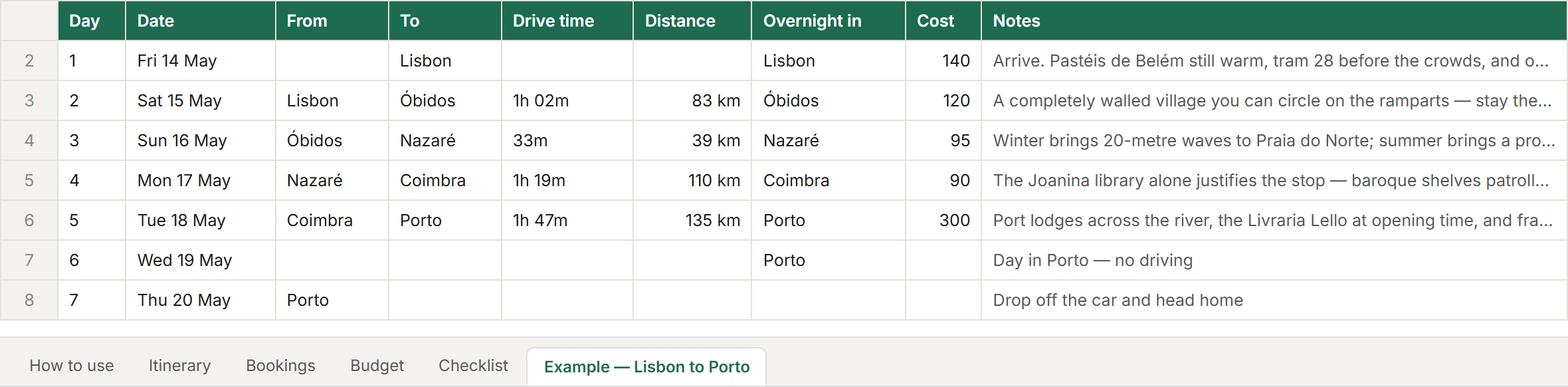
What's in it: a day-by-day itinerary (dates fill themselves from your start date), a bookings log with confirmation numbers and free-cancellation dates, a budget with planned vs actual, a pre-trip checklist, and a filled-in Lisbon → Porto example. The printable version has the same sections on six pages.
How to use the template
- 1
Download it and open it
Excel and Numbers open the .xlsx directly. For Google Sheets, upload it to Google Drive and choose Open with → Google Sheets (or in Sheets, File → Import → Upload). Prefer paper? Print the PDF in Letter or A4.
- 2
Fill in the overnight stops first
In the Itinerary tab, write where you sleep each night before anything else — that's the skeleton of the trip. Type your start date under the table and every row's date fills itself in.
- 3
Add the drives
For each driving day, add from, to, drive time and distance, and the stops along the way. Take the times from a map, not a guess — a mountain or coastal road can take twice what the distance suggests.
- 4
Log every booking with its confirmation number
The Bookings tab has a type list (hotel, car, flight, ferry…), the confirmation number, cost, whether it's paid and the free-cancellation date — the column that saves money when plans change.
- 5
Budget it, then check it off
Fill in Planned per category in the Budget tab and Actual as you go — the difference and totals calculate themselves. Work through the Checklist tab in the weeks before you leave.
Or skip the typing — let Stopful fill it in
A template is only as good as what you type into it, and the drive times are the part people guess. Stopful builds the same itinerary from a map, free and without an account:
Free · no sign-up · no ads — or start from a ready-made route
What's in the spreadsheet
- How to use — the short version, plus how to open it in Google Sheets.
- Itinerary — 14 days, one row each: date, from, to, drive time, distance (km or miles), stops along the way, overnight stop, where you're staying, confirmation number, cost, notes. Totals for distance and cost.
- Bookings — type, name, date, time, confirmation number, address or phone, cost, paid (yes / no / deposit), free cancellation until, notes. Total booked.
- Budget — accommodation, fuel or charging, tolls and vignettes, parking, car rental (with the one-way fee), ferries, food, activities, insurance, other: planned, actual and the difference.
- Checklist — weeks before, the week before, and on the road.
- Example — Lisbon to Porto — a filled-in seven-day trip with real drive times, so you can see what a finished one looks like.
The printable version
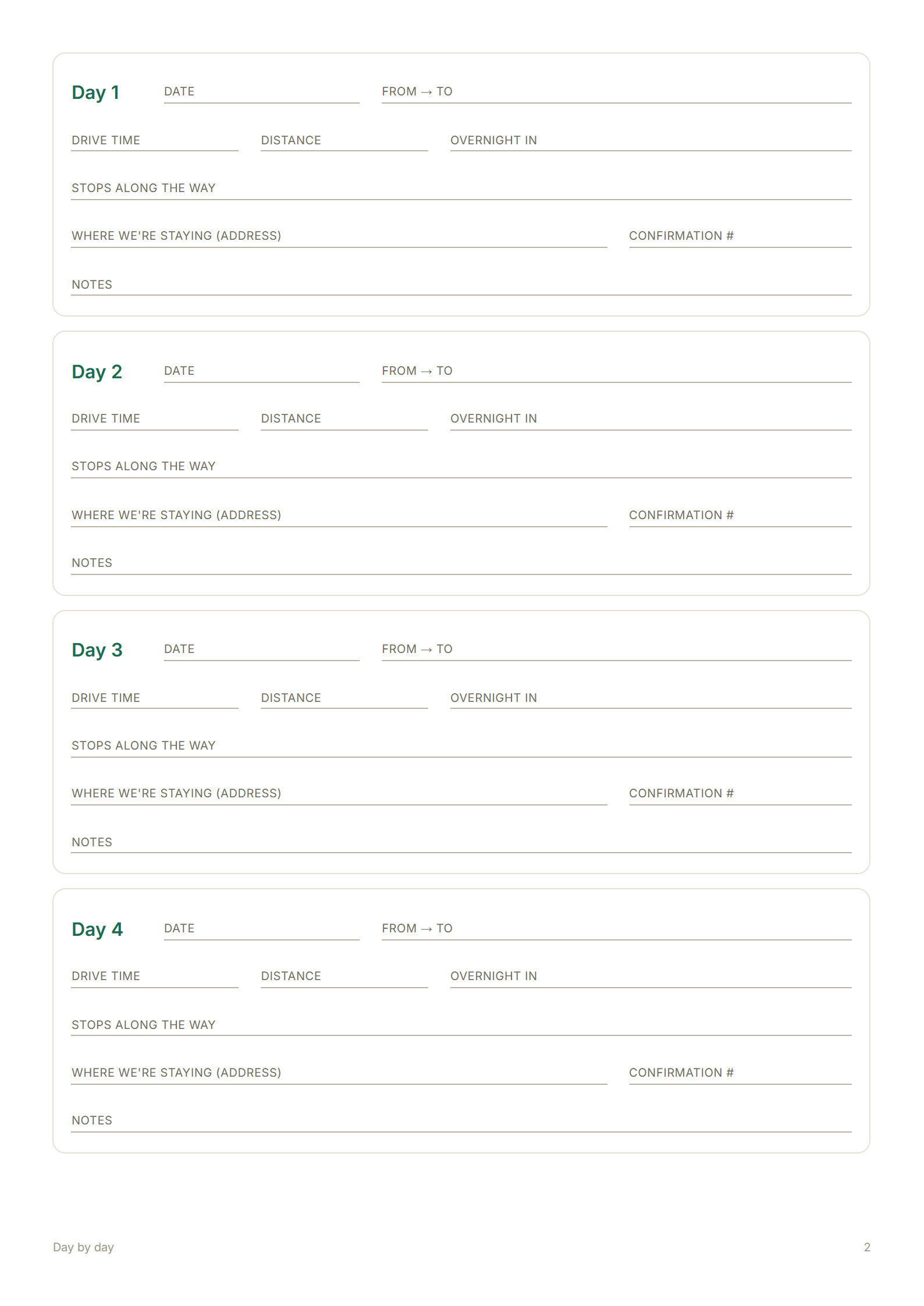
Six pages, in US Letter or A4: a trip overview (dates, travellers, rental, insurance, emergency contact) with a route-at-a-glance table; twelve day boxes, four to a page; bookings and budget; and the checklist with space for notes. Longer trip? Print a day page twice.
What makes a good road trip itinerary
- One row per day, not per stop. Rest days and pass-through stops both disappear in a list of places; a list of days shows the trip's real rhythm.
- Overnights before sights. Where you sleep decides everything else. Fill those in first.
- Drive time, not just distance. 200 km of motorway and 200 km of mountain road are different days — see how far to drive in a day.
- Confirmation numbers, on paper. Phones die at reception desks.
- Free-cancellation dates. Know when each booking stops being flexible.
Road trip itinerary template — FAQ
- Is there a free road trip itinerary template?
- Yes — this one is free with no sign-up: a spreadsheet for Excel, Google Sheets and Numbers (itinerary, bookings, budget, checklist and a filled-in example) and a printable PDF in US Letter and A4.
- How do I use the template in Google Sheets?
- Upload the .xlsx file to Google Drive and choose Open with → Google Sheets, or open Google Sheets and use File → Import → Upload. The formulas (dates, totals, budget difference) keep working.
- Is there a Google Docs version?
- No — an itinerary works better as a spreadsheet, where dates and totals calculate themselves. If you want a document to print, use the PDF version in Letter or A4.
- What should a road trip itinerary include?
- For each day: the date, where you drive from and to, the drive time and distance, stops along the way, where you sleep and its confirmation number, and notes. Add a bookings list, a budget and a pre-trip checklist.
- Can I make a road trip itinerary automatically?
- Yes. Plan the trip on a map in Stopful (free, no account): drive times are calculated for every leg, the trip splits into days, forwarded booking emails add their confirmation numbers, and Print / Save as PDF produces the finished day-by-day itinerary.
- Is there a road trip budget template too?
- The spreadsheet's Budget tab is one: planned vs actual for accommodation, fuel or charging, tolls and vignettes, parking, car rental, ferries, food, activities, insurance and other, with the difference and totals calculated.